Summary
What Is an NFT?
- The simplest definition: a unique digital certificate of ownership of something (art, music, etc).
- How NFT differs from regular files: regular files can be copied endlessly without traceable provenance, whilst NFT proves unique, verifiable ownership on the blockchain (it’s yours!).
- Real-world analogy: Owning an NFT is like holding the signed, numbered original of a limited-edition print—while everyone else just has a copy.
WHAT IS CRYPTOCURRENCY?
- Digital money you can use online, like cash but virtual.
- Not controlled by banks or governments—it runs on a global network.
- Stored in a wallet app you control, like MetaMask or Coinbase Wallet.
- Used to buy NFTs, send money, or invest in digital assets.
- Secured by blockchain, which keeps a public record of every transaction.
- Popular types include Bitcoin (BTC), Ethereum (ETH), and Polygon (MATIC).
WHY CAN I ONLY BUY AN NFT WITH CRYPTOCURRENCY?
- NFTs live on the blockchain, and cryptocurrencies are the native payment method of that ecosystem.
- Smart contracts—which govern NFT ownership and royalties—are programmed to accept crypto like ETH or MATIC, not traditional currencies.
- Crypto wallets (like MetaMask) are designed to interact directly with NFT platforms, enabling secure, traceable transactions.
- Using crypto ensures decentralised ownership, global access, and automated royalty distribution—core to Fab4050’s governance-first model.
WHY DO I NEED A CRYPTO WALLET (METAMASK, COINBASE) TO BUY NFT
Without a wallet, you won’t be able to:
- Prove ownership of your Fab4050 token
- Access the anthem, artwork, and ritual guide
- Receive your share of royalties
- Participate in future token-gated experiences
Step-by-Step: How to Buy Your Fab4050 NFT
STEP 1: SET UP YOUR CRYPTO WALLET.
We recommend MetaMask (though Coinbase is another popular choice)
- Visit https://metamask.io
- Download the browser extension (Chrome, Firefox) or mobile app.
- Follow the prompts to create a wallet.
- Keep a note of your MetaMask wallet address (starts with “0x…”)
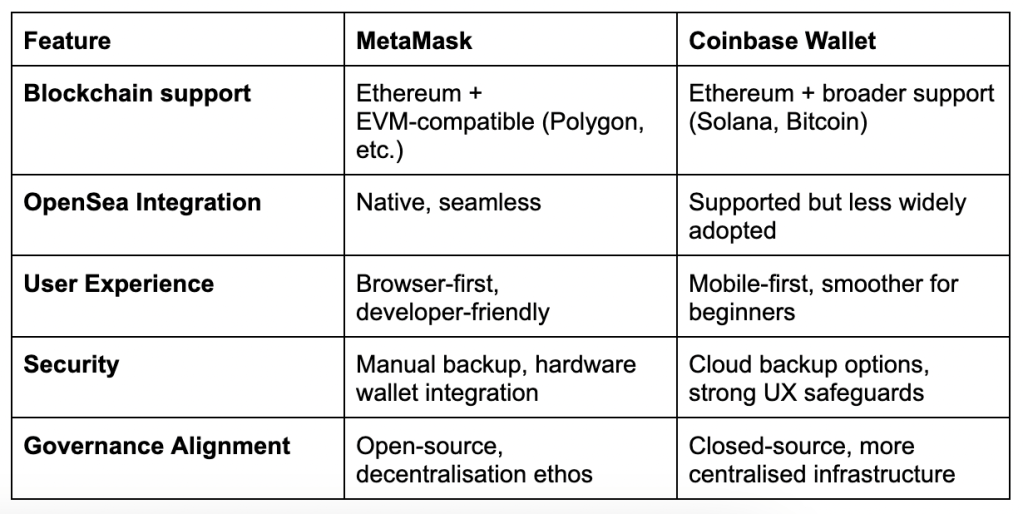
As The Fab4050 NFT is minted on Polygon, and uses OpenSea’s creator tools, MetaMask offers better compatibility, control, and alignment with Fab4050’s governance-first model. It’s also more widely used in the NFT creator community, which helps with onboarding and support.
STEP 2: FUND YOUR WALLET
- Buy crypto from your MetaMask using your credit card, PayPal, etc. ETH is a popular choice for cryptocurrency.
- Ensure you have enough to cover the NFT price and a small transaction fee (“gas”)
STEP 3: CONNECT TO OPEN SEA
You can do this from your MetaMask wallet via the Discover tab and scrolling down to the OpenSea icon. Or:
- Go to https://opensea.io
- Click the wallet icon in the top right
- Select MetaMask and approve the connection
- You’re now ready to browse, buy, and manage your Fab4050 NFT.
STEP 4: MAKE YOUR PURCHASE
- Find the Fab4050 NFT listing
- Click “Buy Now” and follow the prompts
- Confirm the transaction in MetaMask
- Once complete, your NFT will appear in your OpenSea profile under “Collected”
STEP 5: ACCESS YOUR FAB4050 ASSETS
- Unlock the anthem, artwork, ritual guide, and workout video
- Enjoy your digital ownership and royalty participation
- Stay tuned for future token-gated experiences and community activations
GOVERNANCE AND SAFETY TIPS
- Never share your Secret Recovery Phrase.
- Use two-factor authentication where possible
- Fab4050 will never ask for your private keys
- For support, contact Fab4050 directly via verified channels
 www.Fab4050.com